Circling Around Harnesses: Why Pi Won Me Over
Harnesses are the new editors. We explain Pi and how a minimal, extensible harness finally ended the search for one tool that bends to your workflow instead of the other way around.
 Miloš Tepić
Why I Kept Circling Between AI Coding Tools
I like tinkering with tools. Both as a hobby and for actual work. When I started my professional career, I switched between various code editors and IDEs. Every one of them had something that annoyed me. Eventually I settled on Emacs. It’s extensible enough to do whatever you can imagine. You have a toolbar that you don't need? Fine, no need for that. You want to git stash and compile the project with three keystrokes? Of course it can be done.
Why am I writing this? If you are a developer or a software engineer, you probably spend at least half your day in an editor, and you probably want your tools to be easily accessible with as little effort as possible.
Pre-AI, that meant picking the right editor. Post-AI, it means picking the right harness.
I started with Claude Code, then Codex, Gemini CLI, OpenCode. Each of them is good in its own way. I could get along with them, and I could write Python or TypeScript to build my own extension, but as with the editors, some parts were so hard-coded that no matter what, I had to work around them.
I kept circling, hoping somebody would make sane defaults that matched what I like. The cost of that circling is similar to the focus tax described in Switching Contexts Between Projects.
Then I found Pi, and it clicked in the same vein Emacs did. I was free to make it do whatever I wanted.
What a Harness Is and What Makes Pi Different
What distinguishes Pi from other harnesses is minimalism by default. A harness is the software around the model: the system prompt, the tools, the loop that lets it try again, and the layer that decides which model answers. In Pi's case, it is a thin wrapper around the model. You can replace anything, and there are only a few tools in the default toolset when you set it up. You build and extend the workflow around it.
I won't lie, I was using plan mode a lot before jumping into the Pi rabbit hole. At first it was strange doing agentic development without it, but after a few posts from Earendil (the people behind Pi) it made sense.
I built my own plan mode for a while, changing and modifying it whenever I found something that didn't work for me.
This is not to say that planning is bad or that it is missing features. The argument is that a harness should stay out of the way until a feature has earned its place.
The Session Tree: Branching Instead of Linear Chats
Another thing from Pi that blew my mind was the tree. I could jump before, in between, or start a new thread.
Sessions are a tree. You can jump to any earlier point and branch from there.
While I was discovering the rest of Pi's strengths, I stopped using plan mode entirely. What I do now is discuss with Pi what has to be done, and once we agree on everything I branch off into a different session using /clone and start implementing.
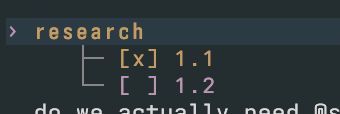
Pi comes with /name, so my per-project sessions are basically research or plans that I eventually implement.
Building Your Own Pi Extensions
The good thing about Pi is that when you ask the model, through Pi, how Pi works, it reads the Pi docs. It knows how the internals work, so there are no hacks; you extend the harness with new features.
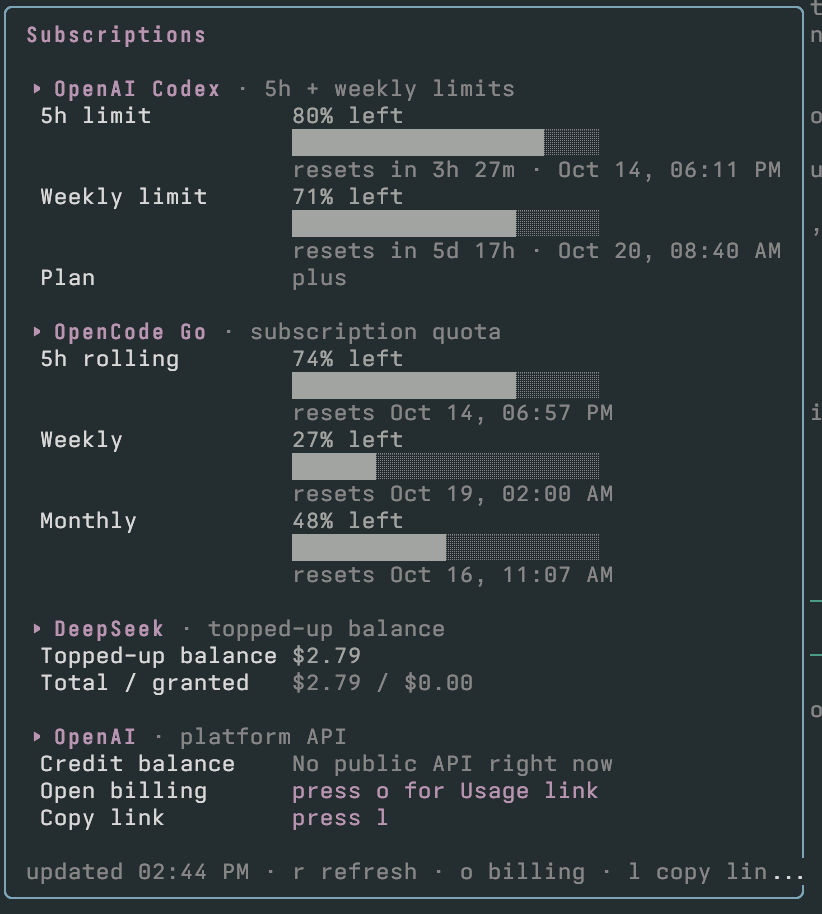
So, another thing I missed was having one place to see how many tokens I had spent in different vendors. Pi doesn't have that, so I built it with a Pi extension.
Oh My Pi: The Batteries-Included Community Distribution
There is a community take on Pi called Oh My Pi. Batteries included. More tools, more opinions, a fuller agent on day one. If you’re just starting out, or if you already align with their vision of what Pi should be, it is a good place to land. But I suggest you start from scratch.
Starting from scratch is how you find out what you actually need. In the same vein as Oh My Pi, there is the official Package Catalog, and you can choose a minimal set of extensions to enrich your Pi.
Or as I said before, write your own extensions!
The Future of Pi and Why I Stopped Circling around
Recently, Pi introduced Codemode, MCP support and Pi Durable, which are also good features. The Pi team postponed adding MCP until it made sense.
Usually when they introduce a new core feature to Pi, there is a pretty good explanation of why they did it, so please check their blog if you haven't already. You will find many good takes on harnesses, agentic development, and more.
I spent a while circling harnesses the way I used to circle editors. Pi ended that. Not because it has every feature. Because it has the feature I wanted from Emacs: when it does not fit, I can change it.
Some people will want Oh My Pi, a plan mode, and a status bar full of widgets. Good. Some people will want four tools and a shortcut that shows three quotas. Also good. The harness is yours either way. That is the point of owning one, instead of renting a chat window and calling it a workflow.
I am still tinkering. I hope I always am. I have just stopped doing it by reinstalling the tool.
References: