The Importance of Source Maps on Sentry
Generating and uploading source maps for a TypeScript project that makes use of Sentry monitoring tools can improve your debugging workflow, accelerate bug resolution, and ultimately deliver a more reliable and robust TypeScript application to your users.
When working on TypeScript projects, we usually don’t pay much attention to what happens after we compile and run the code, we’re just happy when it works, or sad when it doesn’t… But small things in the compiling process can make a big difference, especially on large scale projects.
We’ll explain what source maps are, why they are important and how they affect the development process of TypeScript applications. So as a developer creating a new TypeScript project or working on an existing one, here is why it is recommended to set up source maps on Sentry.
What Are Source Maps
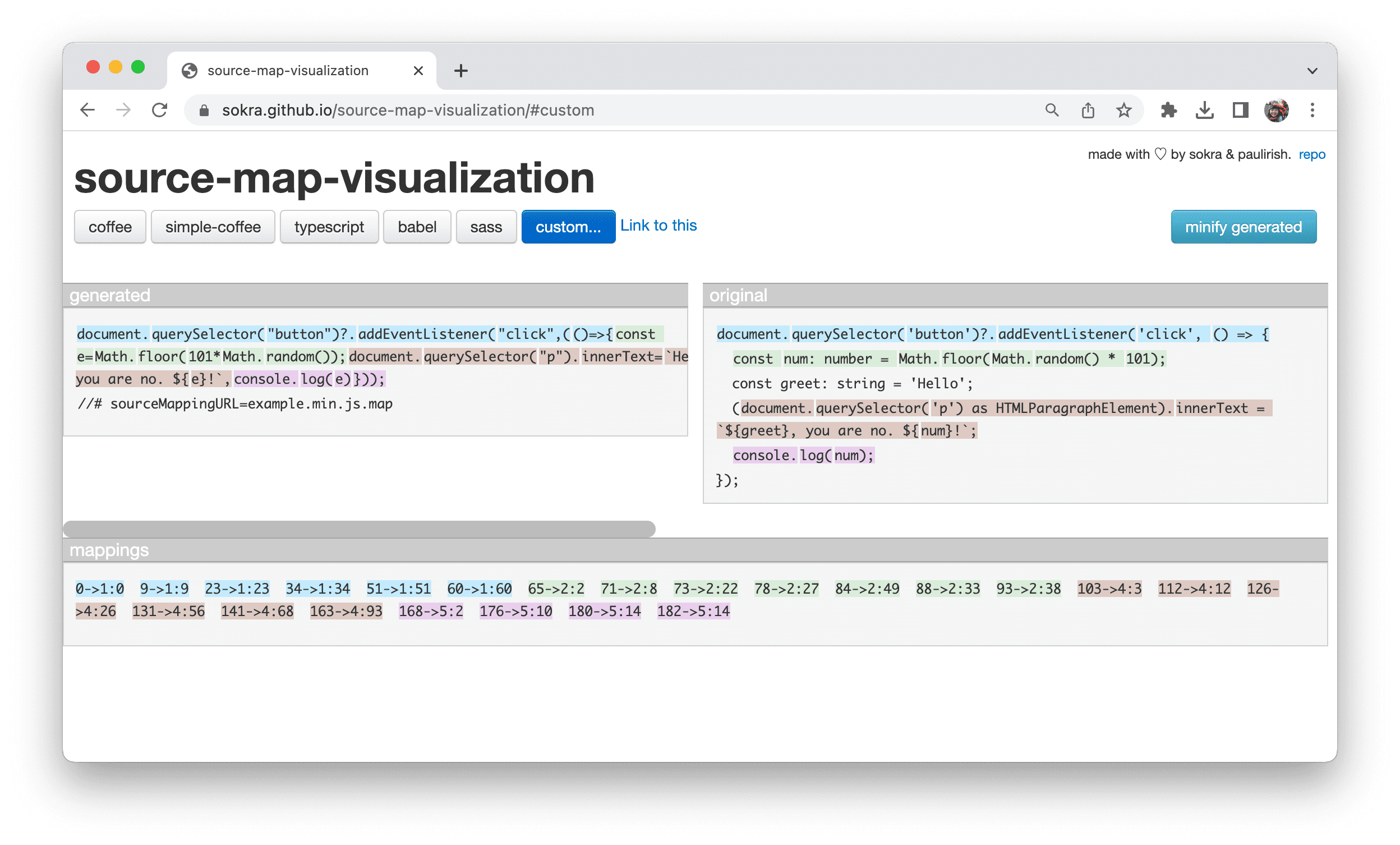
Source maps are files that map the code in compiled or transpiled files back to their original lines in the source code. If we were to take a look at a map file, we might not get much value out of it. But thanks to source maps, tools like Sentry can properly trace errors and exceptions back to the actual lines of code in the source TypeScript files, even after they have been transformed into a different format for execution or deployment.

Image 1. Source map visualization. (Photo by Jecelyn Yeen, 2023)
Benefits of Setting up Source Maps on Sentry
But why should developers go through the trouble of setting this up? Here are the main two factors.
Precise Error Reporting and Improved Debugging Experience
When an error happens in the deployed application, Sentry can offer more comprehensive error reports that can point to the exact spot in the TypeScript source code where that error occurred. This degree of accuracy is crucial for swiftly locating and resolving issues. And because of that, you may then use browser developer tools or IDEs like Visual Studio Code to debug problems right in your original TypeScript code. Compared to logging and troubleshooting minified or transpiled code and attempting to locate the issue line in the original code, this saves much time and effort.
Better Code Understanding and Less Tech Debt in the Future
Source maps improve your comprehension of how the code acts when it is deployed in addition to aiding with troubleshooting. You can observe the relationship between the written code and how it is executed, which helps in making better development choices. Another benefit of having detailed exception information is that you may continuously enhance the stability and efficiency of your application by prioritizing changes according to their impact and thus gain more insights into reoccurring problems.

Image 2. Error report showing the source code.
How to Set Up Source Maps on Sentry
Make sure that source maps are generated throughout the compilation process by your TypeScript compiler or build tool. Usually, to do this, you need to set the “sourceMap” option in your tsconfig.json or build script to “true”.
Upload the generated source maps when updating your deployed JavaScript app using Sentry's CLI tool or API. After that, Sentry will automatically link the source maps to the new app release. The Sentry team provides excellent and more detailed instructions on their website.
To test your Sentry integration, you can create or generate deliberate errors in your application, then confirm that Sentry correctly reports the exceptions using source map references.
Conclusion
Generating and uploading source maps for a TypeScript project that makes use of Sentry monitoring tools can improve your debugging workflow, accelerate bug resolution, and ultimately deliver a more reliable and robust TypeScript application to your users. It is an easy improvement to both the user experience on Sentry and your overall productivity.
References
- Ogórek, K. (2019, February 20). Debug Node.js Projects with Source Maps. Sentry. https://blog.sentry.io/debug-node-source-maps/
- Yeen, J. (2023, March 31). A visualization of the previous code example, generated by a visualizer. [Screenshot]. Web.dev. https://web.dev/static/articles/source-maps/image/a-source-map-visualizatio-4866bc351df59_1920.png