Building Flexible React Components with IoC
Every seasoned developer understands that it’s not just about writing code that works, but more importantly, about ensuring that code is easy to maintain and scale. What really matters is grasping the pros and cons of each pattern and choosing the one that best fits the specific problem at hand. In this sense, a pattern is a tool that helps us tackle design challenges, enhance code quality, and make software development smoother.
Over the past few years, I had the opportunity to work on a project whose functionalities became increasingly complex over time, requiring the development of modular and reusable components that could be easily scaled and maintained. Because of this, the application of appropriate patterns was essential.
During the development of the platform, I encountered situations where it was necessary to display multiple similar UI elements in different contexts. The pattern that completely changed my approach to component development, and efficiently solved these cases, is the Compound pattern in React.
Before we continue further, I would like to briefly touch on Inversion of Control (IoC) so that we can better understand the Compound pattern.
Understanding Inversion of Control (IoC)
In traditional programming, the control flow of a program usually happens within a component or function. This means that the component decides when to call other functions and how to manage them. IoC reverses this flow: instead of the component controlling the flow, control is taken over by an external entity like a container or a parent component.
In the context of React, this means giving the parent component greater control over how the child component behaves or is rendered.
Benefits of Using Inversion of Control (IoC) in React
- Improved reusability: Components become more generic and can be used in different contexts.
- Reduced coupling: Components have less dependency on specific implementations, resulting in greater modularity of the code.
- Enhanced flexibility: The behavior of a component can be easily changed without modifying its code.
- Better testability: Easier testing of components due to fewer dependencies on other parts of the system.
Compound Components Pattern (CCP)
Now that we are familiar with the concept of Inversion of Control (IoC), it becomes easier to understand what the Compound Component pattern is in React. By definition, the Compound Component pattern is a powerful technique in React that enables the creation of reusable and flexible components. This approach allows us to implicitly share state and behavior with child components.
As I have already mentioned, this pattern is particularly useful when building complex UI elements where child components interact with each other and with the state managed in the parent component.
Below, we can see a simple example of implementing a Compound component for Theme functionality:
import React, {
 createContext,
 useContext,

 useState,

 type PropsWithChildren,

} from "react";

/* ================================
  Types
================================ */
type Theme = "light" | "dark";

type ThemeContextValue = {
   theme: Theme;
   setTheme: (t: Theme) => void;
   toggleTheme: () => void;
};

type ThemeProviderProps = PropsWithChildren<{
   initialTheme?: Theme;
}>;

/* ================================
  Context
================================ */
const ThemeContext = createContext<ThemeContextValue | undefined>(undefined);

/* ================================
  Provider
================================ */
function ThemeProvider({ initialTheme = "light", children }: ThemeProviderProps) {
   const [theme, setTheme] = useState<Theme>(initialTheme);
   const toggleTheme = () => setTheme((prev) => (prev === "light" ? "dark" : "light"));
   const value: ThemeContextValue = { theme, setTheme, toggleTheme };

   return <ThemeContext.Provider value={value}>{children}</ThemeContext.Provider>;
}

/* ================================
  Hook
================================ */
function useTheme(): ThemeContextValue {
   const ctx = useContext(ThemeContext);
   if (!ctx) throw new Error("useTheme must be used inside <ThemeProvider>.");
   return ctx;
}

/* ================================
  Compound API
================================ */
const ThemeCompound = {
   Container({ style, ...rest }: React.HTMLAttributes<HTMLDivElement>) {
       const { theme } = useTheme();
       const merged: React.CSSProperties = {
           backgroundColor: theme === "light" ? "#ffffff" : "#000000",
           color: theme === "light" ? "#000000" : "#ffffff",
           padding: 10,
           ...style,
       };
       return <div {...rest} style={merged} />;
   },

   Toggle(props: React.ButtonHTMLAttributes<HTMLButtonElement>) {
       const { theme, toggleTheme } = useTheme();
       return (
           <button type="button" onClick={toggleTheme} {...props}>
               {theme === "light" ? "Light" : "Dark"}
           </button>
       );
   },

   Status(props: React.HTMLAttributes<HTMLSpanElement>) {
       const { theme } = useTheme();
       return <span {...props}>current: {theme}</span>;
   },
} as const;

/* ================================
  Usage
================================ */
function Demo() {
   const { setTheme } = useTheme();
   return (
       <ThemeCompound.Container>
           <div>
               <ThemeCompound.Toggle />
               <button type="button" onClick={() => setTheme("light")}>Set Light</button>
               <button type="button" onClick={() => setTheme("dark")}>Set Dark</button>
               <ThemeCompound.Status />
           </div>
       </ThemeCompound.Container>
   );
}

/* ================================
  App
================================ */
export default function App() {
   return (
       <ThemeProvider initialTheme="light">
           <div>
               <h1>Compound Component: Theme</h1>
               <Demo />
           </div>
       </ThemeProvider>
   );
}
Problems Solved by the Compound Components Pattern (CCP)
Common challenges I’ve encountered with complex forms include dealing with many different input fields, validations, and logic. Without a good approach, the code can become huge, repetitive, and difficult to maintain. Moreover, different parts of the form often need to share state. Manually passing state through props can get complicated (props drilling).
By using the Compound Components Pattern, I was able to break down a complex form into smaller, interconnected components that work together, with their logic and state managed by the parent component. Child components can then focus solely on rendering and user interaction.
In practice, it works as follows:
- Implicit state sharing: The parent component holds the form state and shares it with child components via the React Context API. This approach eliminates the need for manually passing state through props.
- Centralized logic: Validation, submission, and other logic reside in the parent component, which makes the code more organized.
- UI consistency: The parent component defines common styles and behavior for all child components, ensuring a consistent appearance of the form.
- Flexibility and reusability: Child components are simple and focused solely on rendering. They can be easily modified without impacting the rest of the form.
Additionally, they can be reused in other forms. This also involves working with an intuitive API composed of a set of related components, for example: <ThemeCompound.Container />, <ThemeCompound.Status />, <ThemeCompound.Toggle />.
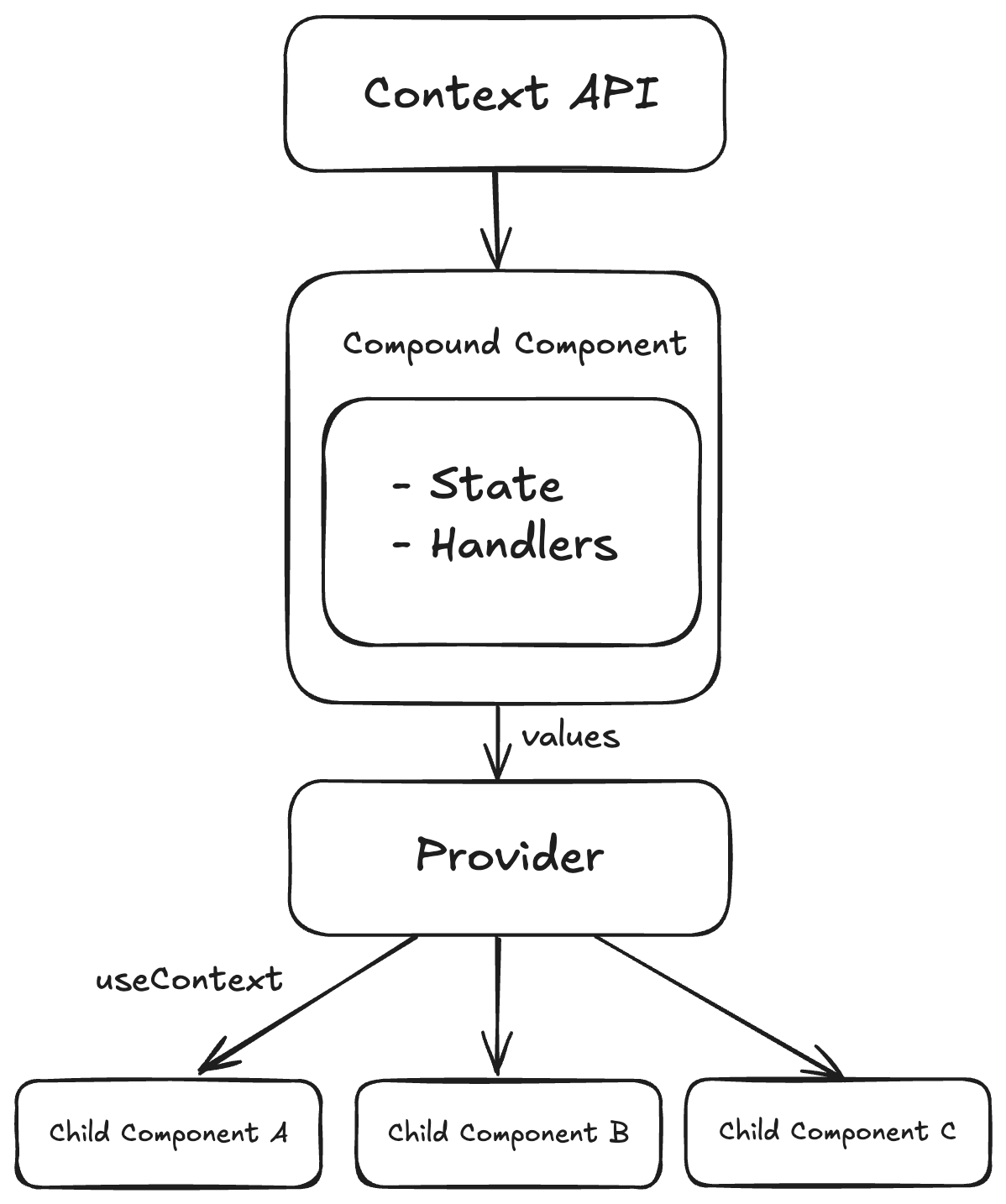
As we can see, the Compound Components Pattern (CCP) offers a powerful way to create flexible and reusable components. However, it's not a one-size-fits-all solution. It is important to understand when to use this pattern and when to consider alternative approaches.
When to use CCP?
- When multiple child components need to access and manipulate the same state.
- When you want high flexibility in how child components are rendered and behave, while maintaining centralized state control.
- When child components must communicate with each other in a complex way, avoiding prop drilling.
- When you want to ensure a consistent look and behavior among related components.
When not to use CCP?
- If you have a simple component with little state, or if the component does not require shared state.
- If frequent context updates cause unnecessary re-renders of child components (although this can be optimized).
- If simpler alternatives exist, such as Render Props or plain component composition, which can solve the problem more straightforwardly.
Key Takeaways and Conclusion
- Inversion of Control (IoC) gives greater control to the parent component, reducing dependencies and increasing flexibility.
- The Compound Components Pattern (CCP) efficiently solves the problem of prop drilling by enabling implicit state sharing.
- CCP enables the creation of reusable, modular components.
- The React Context API allows state sharing between components without the need for manually passing props.
- Understanding and applying appropriate design patterns ensures the maintainability and scalability of a project.
As I mentioned at the beginning, this pattern helped me create modular and flexible components more efficiently. I hope this post has provided a clear insight into the benefits of IoC and CCP in React and the importance of choosing the right pattern in your projects. The essence is simple: if an engineer knows how to pick the right pattern, they know how to manage complexity. And that is the core of engineering.
You might also like reading these blog posts:
Error Handling in Scala: Navigating Try, Either, and ZIO
Dimitrije Bulaja
Stop Chasing Ideas Start Validating Products
Filip Komnenović